
How to dictate a book on your Android phone
You can write a book without typing it. Talk through a scene on a walk, in the car or on the sofa, and Stengr turns it into text and files it in the right chapter of your manuscript.
This guide covers the whole process, from the first chapter to a Word or Scrivener file you can keep editing on a computer. It works for novels, memoirs and non-fiction. Stengr runs on Android and needs an internet connection.
Why dictate a book
Most people speak faster than they type. Speaking also keeps you moving forward: in a first draft you tell the story instead of polishing every sentence. You can write wherever you are, away from the desk, and dialogue often sounds more natural when you say it out loud.
Dictate a book in Stengr, step by step
- 1
Create a project
Open the Projects tab and create a project. Choose Fiction (chapters and scenes) or Non-fiction (chapters and sections).
- 2
Plan your chapters
Add chapters and give them titles if you like. You can add and rename chapters at any time.
- 3
Add character and place names
Open the Names dictionary and add your characters, places and rare terms. Stengr uses the list when it turns speech into text and when it cleans the text, so an invented name is spelled the same way in every scene.
- 4
Dictate a scene
Tap Dictate and talk. When you stop, Stengr turns the recording into text with punctuation, and the scene appears in its chapter. Recordings you made earlier can join a project too: open one in the Archive and choose Add to project…
- 5
Clean the text
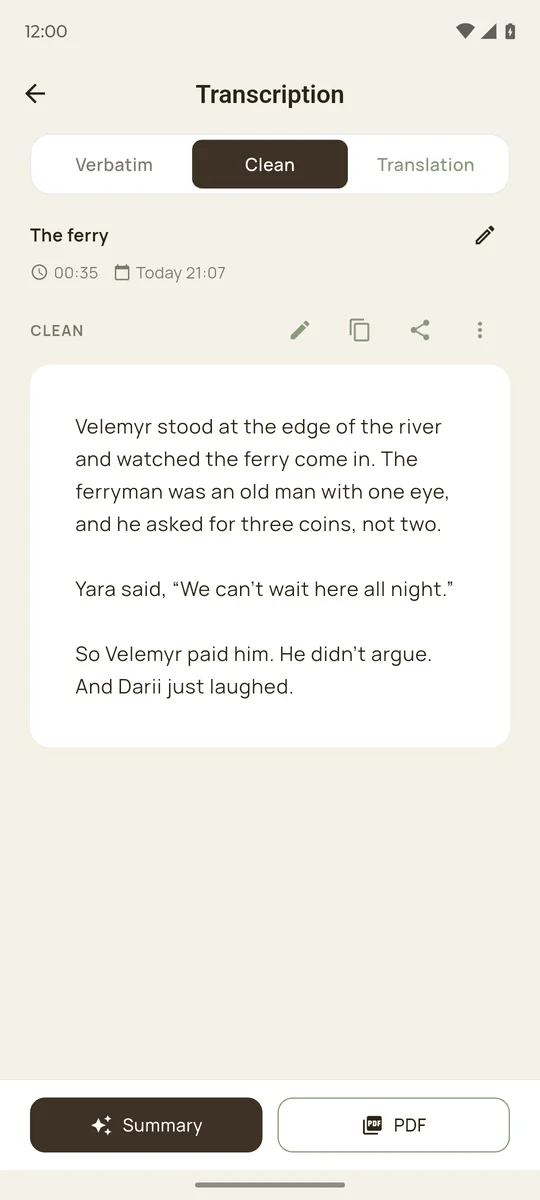
Open the Clean tab. Stengr removes “um”s, false starts and repetitions. When you correct yourself (“no, wait, she was in the kitchen”), it keeps only the corrected version. It fixes grammar and formats dialogue by the rules of your language. Clean doesn’t translate, shorten or rewrite your story, and the verbatim text stays available.
- 6
Put scenes in order
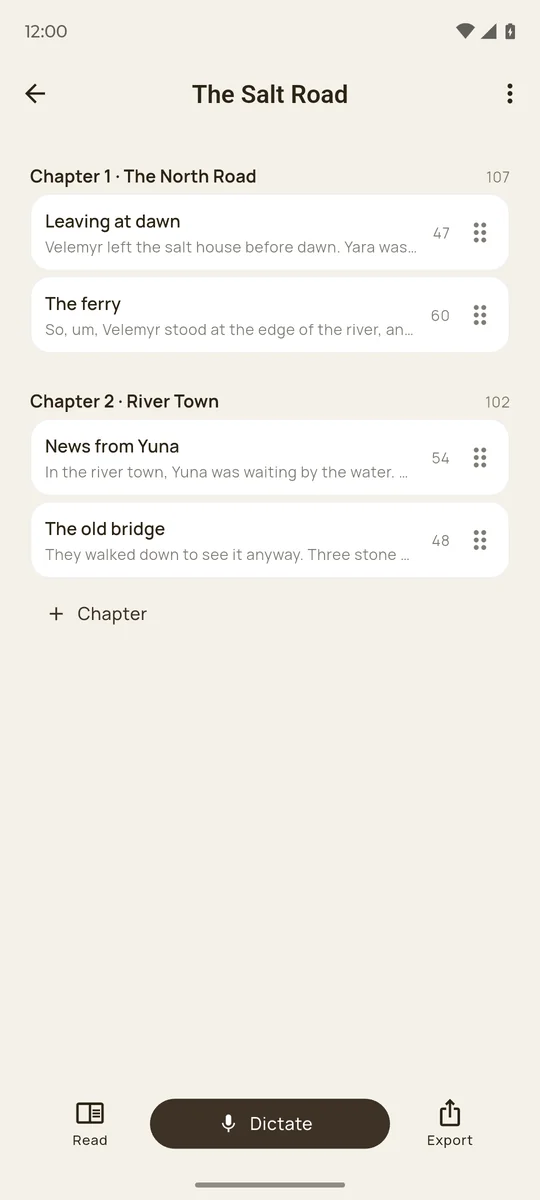
Drag scenes to reorder them, or move a scene to another chapter. Word counts appear next to every scene and chapter.
- 7
Read the whole book
Tap Read to go through all scenes as one continuous text. Where a scene has a clean version, you read that one.
- 8
Export
Share the book as text, save a .txt file, or export a Word file (.docx) with chapters as headings. It opens in Word, Google Docs and Pages. For Scrivener there is a separate file: import it with Import and Split, and every scene becomes its own document in the binder.
Tips for dictating fiction
- One scene, one recording. Short recordings are easier to clean, move and reorder.
- Keep a short plan in front of you: who is in the scene, where it happens and how it ends.
- Don’t stop to fix mistakes. If you misspeak, say the sentence again. Clean keeps the corrected version.
- Skip “comma” and “full stop”. Punctuation is added for you.
- Say dialogue the way your characters would. Clean puts each line of dialogue in its own paragraph.
- Edit on a computer at the end, in Word, Google Docs or Scrivener.
Memoirs and family stories
A memoir can start with a conversation. Record a parent or grandparent telling their stories, add each recording to a chapter, and Clean turns spoken memories into readable text while keeping their words. Stengr transcribes more than 32 languages, and a scene can be translated for relatives who read another language.
What it costs to dictate a book
Free $0
One project to try it: 5 minutes of transcription a month, recordings up to 3 minutes, Clean for 3 scenes, 5 names. Share as text or .txt.
Plus $4.99/mo
600 minutes of transcription a month, recordings up to 1 hour, no project limits, Word and Scrivener export. 7-day free trial.
Pro $12.99/mo
1,500 minutes a month and recordings up to 2 hours, for long sessions and several books at once. 7-day free trial.
At a typical speaking pace of about 130 words a minute, 600 minutes comes to roughly 78,000 words, about the length of a full novel draft. This is an estimate; your pace depends on how you dictate.
Questions
Which languages can I dictate in?
More than 32 languages, including English, Spanish, German, French, Polish and Ukrainian. Clean keeps the language of the original and uses its rules for dialogue and quotation marks.
Do I have to say the punctuation?
No. Stengr adds punctuation itself, and Clean also splits the text into paragraphs.
How long can one recording be?
Up to 3 minutes on Free, 1 hour on Plus and 2 hours on Pro.
Will Clean change my story?
No. It removes filler words and repetitions, fixes grammar and formats the text, but it doesn’t paraphrase, shorten or add anything. The verbatim version stays next to it.
Can I import the book into Scrivener?
Yes, on Plus and Pro. Export the Scrivener file, then use Import and Split in Scrivener, and every scene becomes its own document.
Where is my manuscript stored?
Only on your phone. There is no sign-up, and your texts are not kept on Stengr servers. If you reinstall the app or lose the phone, the projects are gone, so export a Word or .txt copy regularly.
Does it work offline?
No. Turning speech into text and Clean need an internet connection.
Is there an iPhone version?
Not yet. Stengr is available for Android on Google Play; you can join the iOS waitlist on the home page.